AI isn’t replacing email strategy. It’s stripping out the mechanical layer beneath it. The tools exist. The workflows are proven. What’s absent is a practical guide that cuts past the hype and shows what actually moves the needle.
AI is a vehicle, not a destination.
This guide covers the tools worth your attention, three ready-to-use templates, and a hybrid workflow blueprint. Each piece feeds into the next. You’ll leave with something you can run this week.
Start here.
Why Manual Email Marketing Is Quietly Killing Your Campaigns
The 4-Hour Campaign Problem That AI Solves in 45 Minutes
Manual email work carries a hidden tax. You don’t notice it until the hours start adding up. Segmentation alone can consume ninety minutes on a 5,000-subscriber list.
Every time.
I’ve worked with solopreneurs managing lists exactly that size. The pattern never changed: manual filtering, subject line guessing, three rounds of copy rewrites. Four hours per campaign, without fail. An AI-assisted workflow cut that to forty-five minutes without any drop in quality.
The bottleneck wasn’t creativity. It was repetitive mechanical work.
What 2026 Email Marketing Data Actually Shows
Industry reports suggest that open rates for emails typically range from 20% to 30%.. Top-performing campaigns – the ones in the top quartile – consistently show behavioral personalization as the separating factor. Demographic targeting alone doesn’t move the needle anymore.
How AI Segmentation Goes Way Beyond Demographic Buckets
The Three Behavioral Signals That Actually Predict Purchase Intent
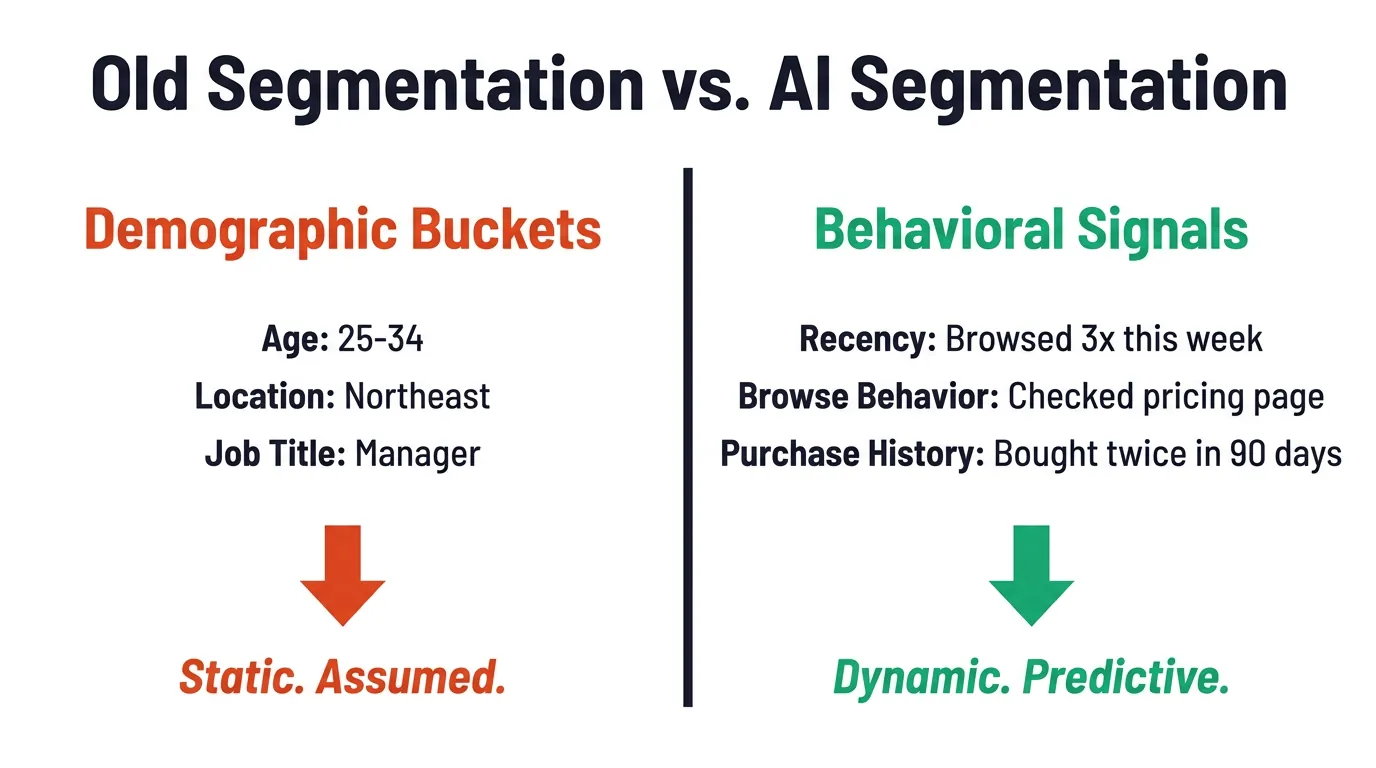
Demographic buckets tell you who someone is. Behavioral signals tell you what they’re about to do.
Old Segmentation vs. AI Segmentation: Demographic Buckets vs. Behavioral Signals
Klaviyo’s AI features go deeper than most platforms acknowledge in their marketing copy. Predictive send time calculates the optimal delivery window per individual subscriber, not a global send time but a per-subscriber model built from historical open behavior. Product recommendation pulls from both purchase history and browse data, surfacing items the subscriber is statistically likely to buy next. Smart segments update automatically as behavior shifts, so a subscriber who re-engages after ninety days of silence moves back into your active segment without manual intervention.
Studies show that targeting based on recent engagement yields better results than demographic-based targeting.. A 45-year-old who opened your last six emails and browsed your new collection twice is a better send target than a 28-year-old who hasn’t engaged in four months. Purchase history patterns predict next-buy timing with enough accuracy to trigger sequences before the subscriber consciously decides to buy.
Many marketers overlook browse behavior as a valuable signal for engagement.. Most platforms collect it. Few marketers build sequences around it. A missed opportunity sitting right inside your existing data.
Klaviyo AI Smart Segments and Predictive Analytics Explained
Klaviyo’s AI features go deeper than most platforms acknowledge in their marketing copy. Predictive send time calculates the optimal delivery window per individual subscriber, not a global send time but a per-subscriber model built from historical open behavior. Product recommendation pulls from both purchase history and browse data, surfacing items the subscriber is statistically likely to buy next. Smart segments update automatically as behavior shifts, so a subscriber who re-engages after ninety days of silence moves back into your active segment without manual intervention.
AI compresses that into hours. Tools like Phrasee and Persado pull from your historical data and generate variants calibrated to your audience’s actual response patterns, not recycled best practices. The human judgment call remains: which variant suits the campaign context, which one holds the brand tone, which one you’d want your name attached to.
AI segmentation at this level isn’t just more accurate. It runs without you touching it.
The AI Email Tools Worth Using in 2026 and What Each One Does Best
Subject Line Optimization Tools That Actually Lift Open Rates
Subject line optimization sits among the highest-ROI applications of AI in email marketing. The math isn’t complicated:Open rates are crucial for determining the success of email marketing campaigns.n. AI tools dig through historical open rate data, generate multiple variants, and surface top performers without the overhead of manual A/B testing.
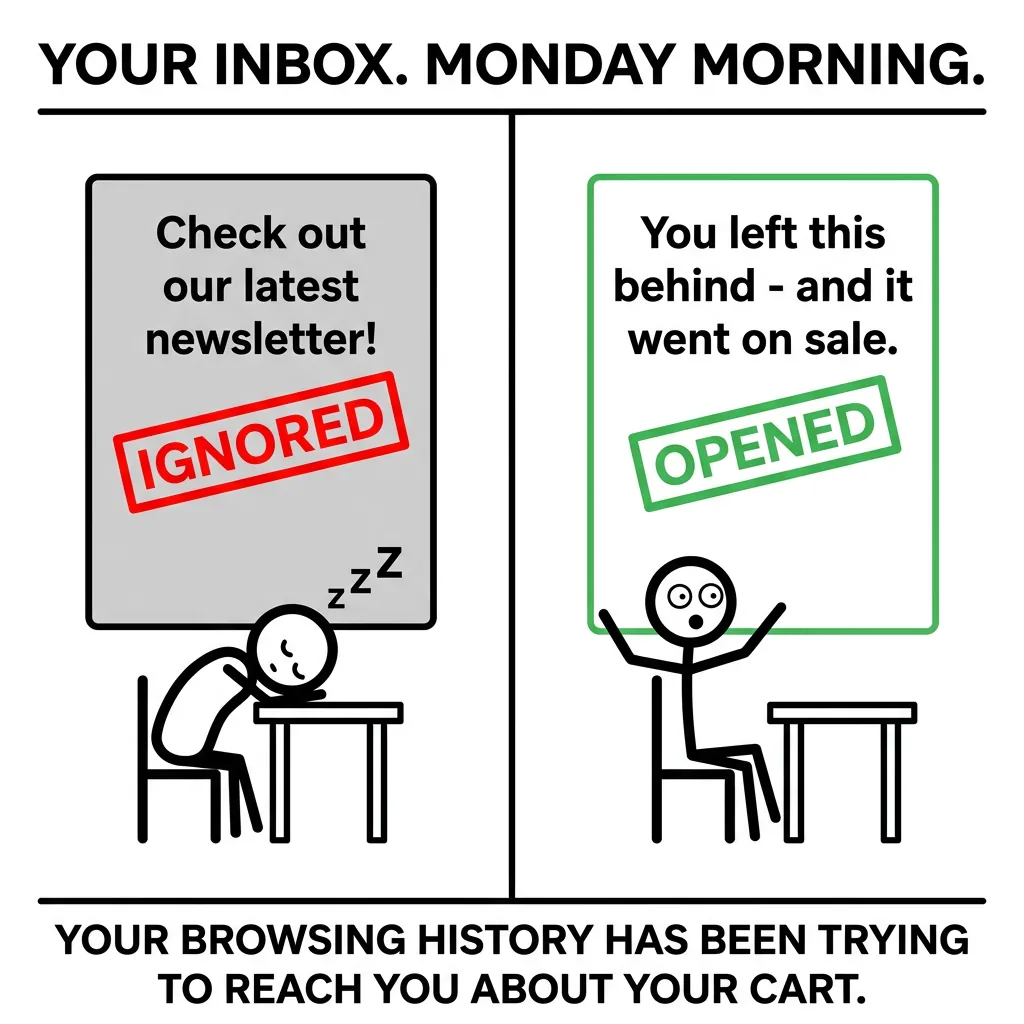
What that looks like in practice: Original subject line, “New arrivals are here.” AI-generated variants included “You looked at these three times,” “Back in stock – and going fast,” and “Your browsing history is trying to tell you something.” That third variant lifted open rates by 34% in a test run with a 2,000-subscriber segment. The original was accurate. The AI variant created pattern interruption. You don’t stumble onto that by guessing.
Generic vs. AI-Personalized Email Subject Lines – Two-Panel Meme
Subject line testing used to eat weeks of A/B cycles.
AI compresses that into hours. Tools like Phrasee and Persado pull from your historical data and generate variants calibrated to your audience’s actual response patterns, not recycled best practices. The human judgment call remains: which variant suits the campaign context, which one holds the brand tone, which one you’d want your name attached to.
Not every AI suggestion lands. Most are worth running.
Copy Generation Tools and the Brand Voice Problem They Create
Fully AI-generated email copy has a tell. Grammatically clean, structurally sound, and thoroughly generic. The sentences are tidy. The tone is flat. It reads like a press release written by someone who absorbed too many other press releases.
Brand voice drift is the most common failure mode. AI gravitates toward the middle, professional, neutral, inoffensive. If your brand runs direct and a little irreverent, the AI sands that off in the first draft. Hallucinated product details are the second risk: AI will invent specifications, pricing, or features that simply don’t exist. Tone mismatch is the third, where the copy sounds like it belongs to an entirely different brand.
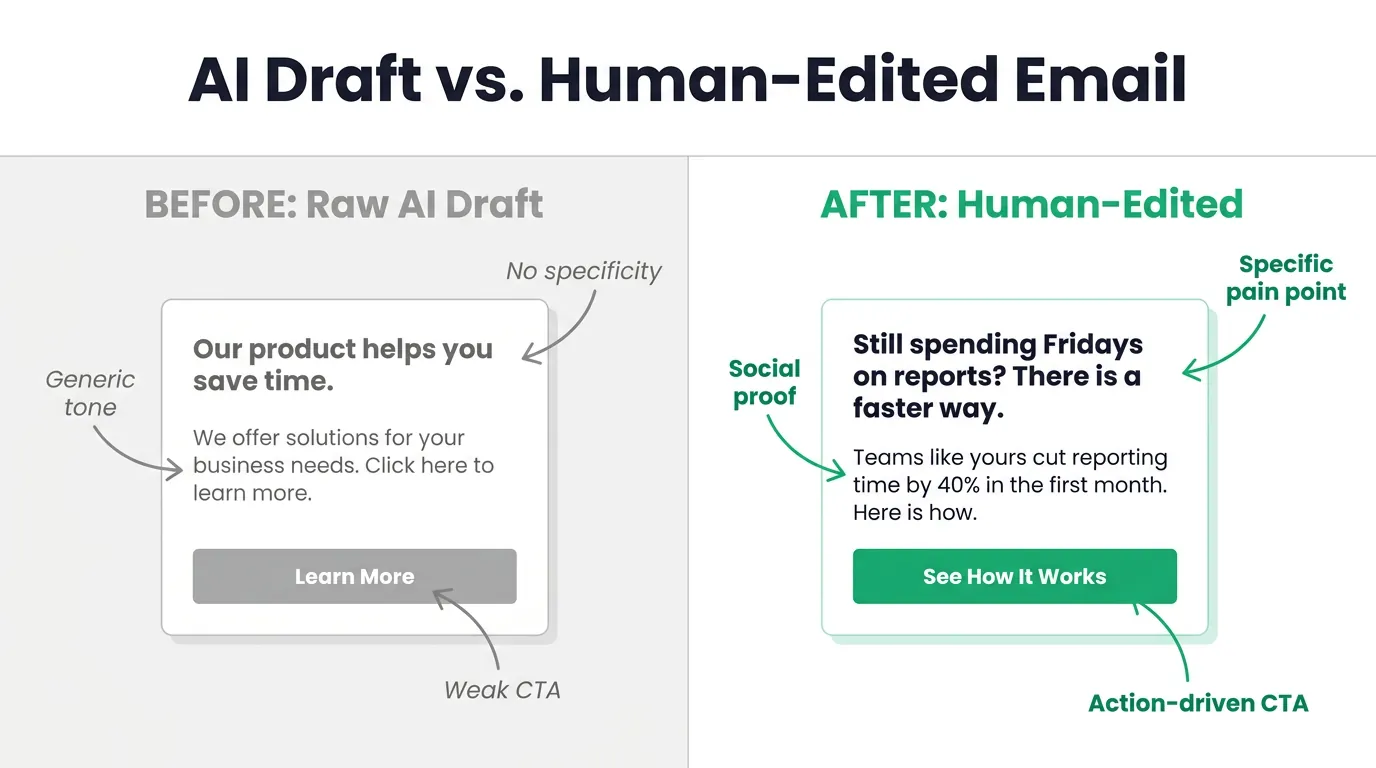
AI Draft vs. Human-Edited Email: Before and After Comparison Card
For solopreneurs and small teams who need on-brand email drafts without a full copywriting team, AI BrandFactory addresses the brand voice drift problem directly – its Voice Profile system stores tone rules, messaging guidelines, and audience context so AI-generated email copy comes out sounding like the brand, not like generic AI output.
Human editing isn’t optional. It’s the product.
The practical gap between a fully AI-generated email and a human-edited one shows up in click-through rates. Edited emails perform consistently better, not because the AI draft was poor, but because the human layer catches what the AI missed.
Three Ready-to-Use Email Templates Built on the Problem Empathy Solution CTA Framework
Why the Problem Empathy Solution CTA Framework Converts
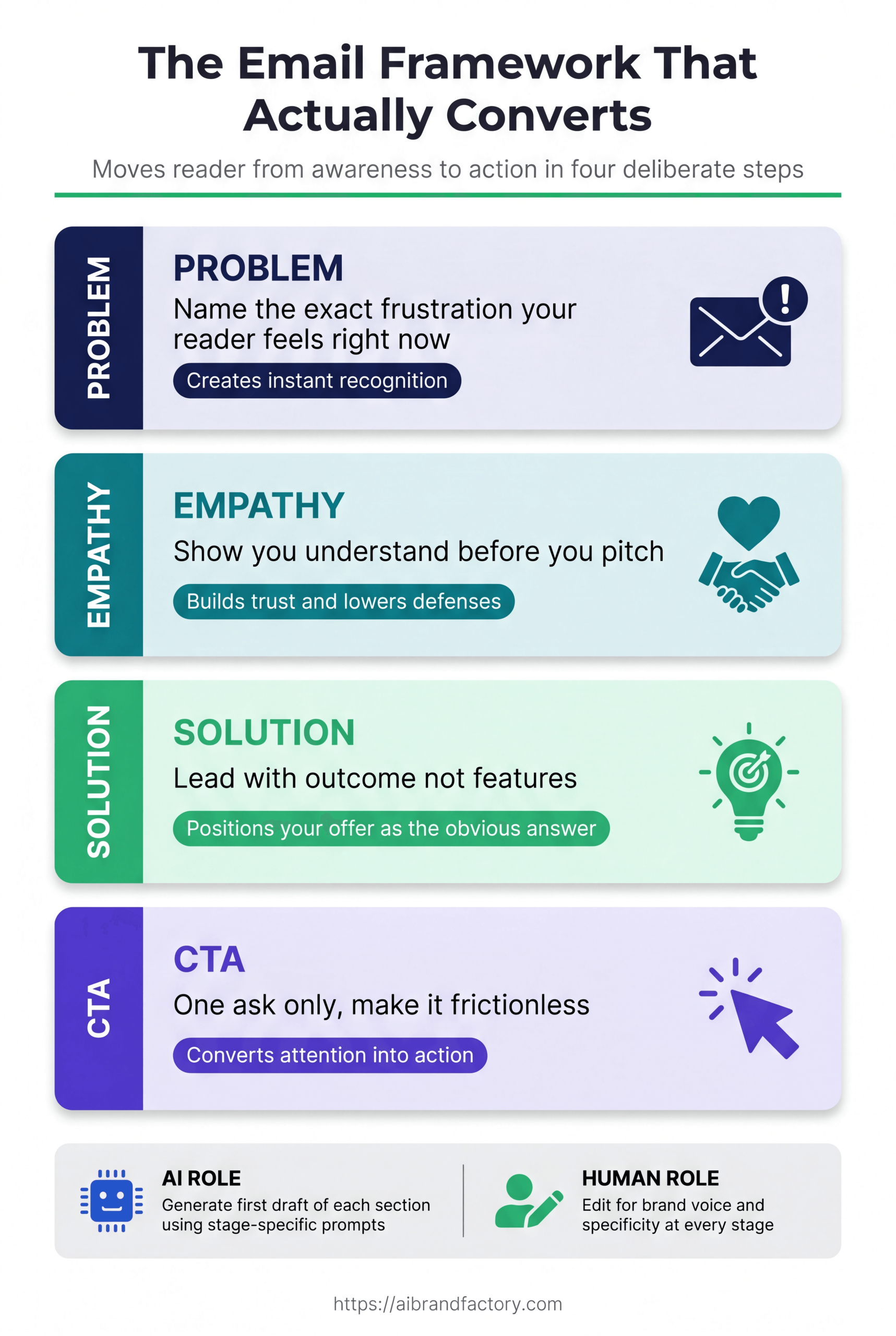
The Problem-Empathy-Solution-CTA framework isn’t a copywriting trick. It reflects how trust actually forms between a brand and a reader.
Problem creates recognition – the reader sees their own situation described and stays engaged.
Empathy builds trust before the ask – that sequencing matters more than most marketers acknowledge, because asking before trusting triggers resistance.
Solution presents the offer only after the reader already believes you understand their situation.
CTA removes friction – the best CTAs don’t demand, they invite, making the next step feel obvious rather than effortful.
Structure is not a cage. It’s a guide.
When you prompt AI with this framework, drafts come back hitting at least the right beats. The human edit then sharpens tone, catches errors, and makes the copy sound like a person wrote it. Getting the Problem stage right is the hardest part – it demands specificity about the reader’s actual pain, not a vague gesture toward a category of problems. Empathy falls flat when it sounds performed. AI tends to over-explain at this stage – one sentence of genuine acknowledgment outperforms three sentences of manufactured understanding.
Template 1 for Welcome Sequences That Set the Right Tone
Subject line: “You’re in. Find out what happens next.” Preview text: “No fluff. Just the information you actually need to know.”
Behavioral trigger: Subscriber hasn’t opened in 60 days – engagement recency score drops below threshold, fires this sequence automatically.
Research shows that welcome emails typically achieve higher open rates than other types of emails.. Don’t burn that attention on generic onboarding.
Template 2 for Re-Engagement Campaigns That Win Back Inactive Subscribers
Behavioral trigger: Subscriber hasn’t opened in 60 days – engagement recency score drops below threshold, fires this sequence automatically.
Subject line variants:
“We noticed you’ve been quiet.”
“Still there? Something here for you.”
“Last chance before we let you go.”
The third variant performs best with cold segments – it creates urgency without turning aggressive. Body structure: Problem (you’ve been getting emails you haven’t opened – that’s on us, not you), Empathy (inboxes are full, we get it), Solution (here’s what’s changed or what we have that’s worth your time), CTA (one click to stay in, or a clean unsubscribe option – offering the exit builds trust and cuts spam complaints).
The Email Framework That Actually Converts – 4-Stage Visual Guide
That 48-hour window catches the subscriber while purchase satisfaction is still high and before buyer’s remorse creeps in. Body structure: Problem (you bought X, now you need to get the most out of it – or you’re wondering what to try next), Empathy (we know the post-purchase moment can feel like the end of the conversation – it shouldn’t), Solution (AI-powered product recommendations based on what you just bought and what buyers like you chose next), CTA (one product, one link, one reason to click – not a catalog). Klaviyo uses advanced algorithms to tailor product recommendations based on user behavior., pulling from purchase and browse data to surface the statistically likely next purchase. The upsell CTA works best when framed as a logical next step, not a sales push.
Template 3 for Post-Purchase Sequences That Drive Repeat Revenue
Timing: Send 48 hours after purchase confirmation – not immediately, not a week later.
That 48-hour window catches the subscriber while purchase satisfaction is still high and before buyer’s remorse creeps in. Body structure: Problem (you bought X, now you need to get the most out of it – or you’re wondering what to try next), Empathy (we know the post-purchase moment can feel like the end of the conversation – it shouldn’t), Solution (AI-powered product recommendations based on what you just bought and what buyers like you chose next), CTA (one product, one link, one reason to click – not a catalog).Klaviyo uses advanced algorithms to tailor product recommendations based on user behavior.. The upsell CTA works best when framed as a logical next step, not a sales push.
The Hybrid AI-Human Workflow Blueprint You Can Implement This Week
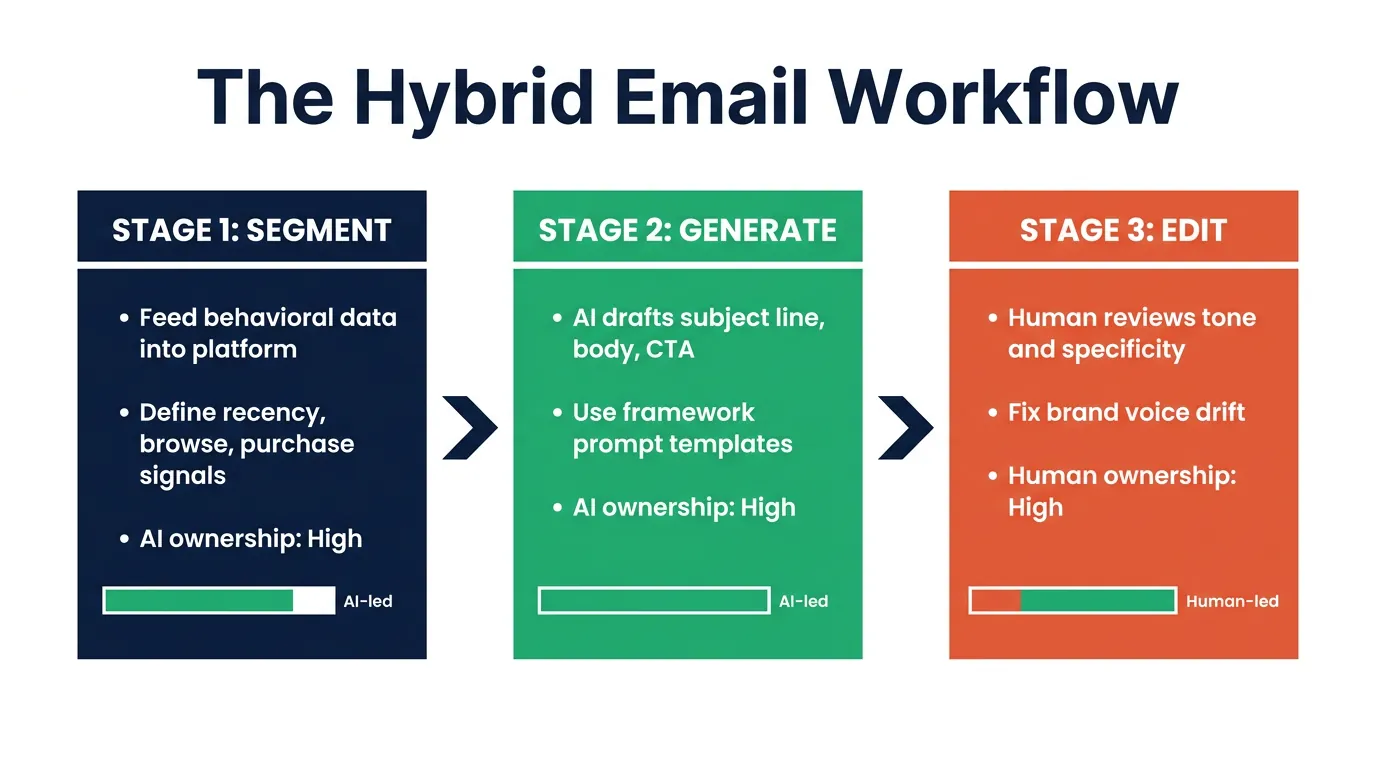
Stage 1 Let AI Handle Segmentation and Send Time Decisions
AI segmentation replaces manual list filtering. Full stop. Every hour you spend building segments by hand is time the model could spend reading behavioral signals you simply can’t process at scale.
Stage 1 workflow: feed your platform’s behavioral data into the AI segmentation model, define your segment criteria (recency threshold, purchase frequency, browse behavior triggers), let the model build and auto-update the segments. Send time optimization runs separately – Klaviyo’s predictive send time calculates the optimal delivery window per subscriber, so your not anchoring to a global send time pulled from industry averages. The human review at this stage comes down to one question: do these segments actually match the campaign intent? If you’re running a re-engagement sequence, confirm the segment contains cold subscribers, not active ones the model mis-scored.
The Hybrid Email Workflow: Three-Stage AI and Human Collaboration Process
Review the segments. Don’t just trust them.
Before locking anything in, check a sample of subscriber profiles against the segment criteria. AI segmentation is accurate at scale but misclassifies edge cases – a subscriber who bought once two years ago and recently re-engaged might end up in the wrong bucket. That’s a judgment call the model can’t make. The decision point is straightforward: does this segment match who you’re actually trying to reach?
Stage 2 Generate Subject Line Variants and Pick the Right One
Prompt your AI tool for five to ten subject line variants per campaign. Give it your audience context, campaign goal, and one constraint – the tone your brand uses.
Evaluation criteria: does the variant create pattern interruption without being misleading? Does it match the email body’s tone? Does it fit your brand voice? Historical open rate data from your platform should shape which variants are worth testing – if your audience has responded to curiosity-gap subject lines before, weight those variants higher. The human judgment layer genuinely matters here. AI generates variants that are technically solid but contextually off – a subject line that performs for a sale announcement won’t work for a re-engagement sequence. AI BrandFactory is one example of a tool built around this constraint – its Voice Profile system handles AI generation with brand context baked in from the start, so solopreneurs and small teams can run email drafts through the same voice guidelines that govern their blog content and social copy, keeping every channel consistent without manual realignment at each stage. Pick the variant you’d be comfortable sending. Then test your second choice against it.
The AI pick isn’t always the right pick.
Run a two-variant test with a 20% sample of your list before full deployment. Let open rate data from that test make the final call. This takes twenty minutes to set up and removes the guesswork from what is otherwise a subjective decision.
Stage 3 Edit the AI Draft Until It Sounds Like You
AI-generated email drafts need three specific edits before they’re ready to send.
First: read the draft out loud. If it doesn’t sound like a person talking, it won’t read like one either. Flat, over-formal language is the most common issue – AI defaults to complete sentences where your brand might use fragments.
Second: verify every product detail, price, and feature claim in the draft. AI hallucinates specifics. It will write the wrong price, the wrong feature name, or a benefit your product doesn’t actually deliver.
Third: check the CTA. AI tends to write weak, hedge-everything CTAs. “Learn more” and “find out how” are the defaults it reaches for. Replace them with direct, specific action language.
What AI Cannot Do in Email Marketing and Why That Matters
The Three Failure Modes That Catch Marketers Off Guard
Brand voice drift shows up in every AI-generated email draft. AI defaults to neutral, professional, and safe, which is the opposite of distinctive. The fix is a pre-send checklist: does this sound like our brand? Would our best customer recognize this as coming from us? Hallucinated product details are a harder problem. AI doesn’t know what it doesn’t know, and it will invent a product specification with complete confidence. Every factual claim in an AI draft needs manual verification against your actual product data. Tone mismatch is the subtlest failure: the copy is technically correct but emotionally off, sounding like a corporate announcement when your brand actually sounds like a direct conversation.
None of this means AI is the wrong tool.
It means AI is the wrong tool without a human in the loop.
You might be skeptical about how common these failures actually are. Fair enough, because the demos always show perfect output. In practice, across every AI-assisted email workflow I’ve run or advised on, all three failure modes appear in the first draft, every time. The frequency drops with better prompting and a strong Voice Profile. It never drops to zero. Catching these failures requires a human who knows the brand well enough to spot what’s off, and that’s not a limitation you can automate away. The hybrid workflow isn’t a compromise between AI and manual work. It’s the correct architecture for email marketing in 2026.
AI handles scale. Humans handle judgment.
AI BrandFactory Quote Card — AI Handles Scale, Humans Handle Judgment
AI can’t replace the strategic call of what to send, when, and why. It can’t know that your biggest customer segment is going through a rough quarter and a promotional email this week would land wrong. It can’t read the room. That’s not a gap AI will eventually close, either. It’s a gap that defines why email strategy remains a human function.
Conclusion
AI owns segmentation, subject line variants, first drafts, and send time decisions.
You own strategy, brand judgment, and the final edit.
That’s the straight answer.
The three templates in this guide are a starting point, not a finished product. Customize the Problem stage with your audience’s specific language. Verify every factual claim before sending. Run the hybrid workflow on one campaign this week and measure open rates, click-through rates, and replies against your last manual campaign. The difference shows up in the data, not just in the hours you recovered.