Humanize AI Text Without Losing Your Brand Voice
You run AI content through a humanization tool and get clean output. Passes every detector, reads smoothly, means nothing to anyone who actually knows your brand. The writing was never the real problem. The order of operations was. Most writers treat humanization as a final patch, when voice encoding is the true starting point. A 5-step framework exists that separates these two jobs cleanly.
Brand voice doesn’t survive a rescue operation.
Build it upstream, and humanization gets easy. Skip that step, and no tool pulls you out.
This article gives you the framework.
Why Your Humanized AI Content Still Sounds Like Everyone Else
The Brand Manager Scenario Nobody Talks About
You’ve seen this moment. The draft looks polished, the detector reads clean, and something still feels off.
You read it twice. Sentences flow. Structure holds. The tone is professional, inoffensive, not robotic in any obvious way. But it doesn’t sound like you either. (admittedly, this is the hardest thing to explain to someone who hasn’t felt it) Technically correct. Strategically hollow.
Generic is the new robotic.
That gut-check failure isn’t subjective. It’s diagnostic. Your brand carries a specific rhythm, specific opinions, specific ways of talking to readers. That content has none of them. Detection tools measure AI patterns. Brand managers measure identity. Two completely different tests.
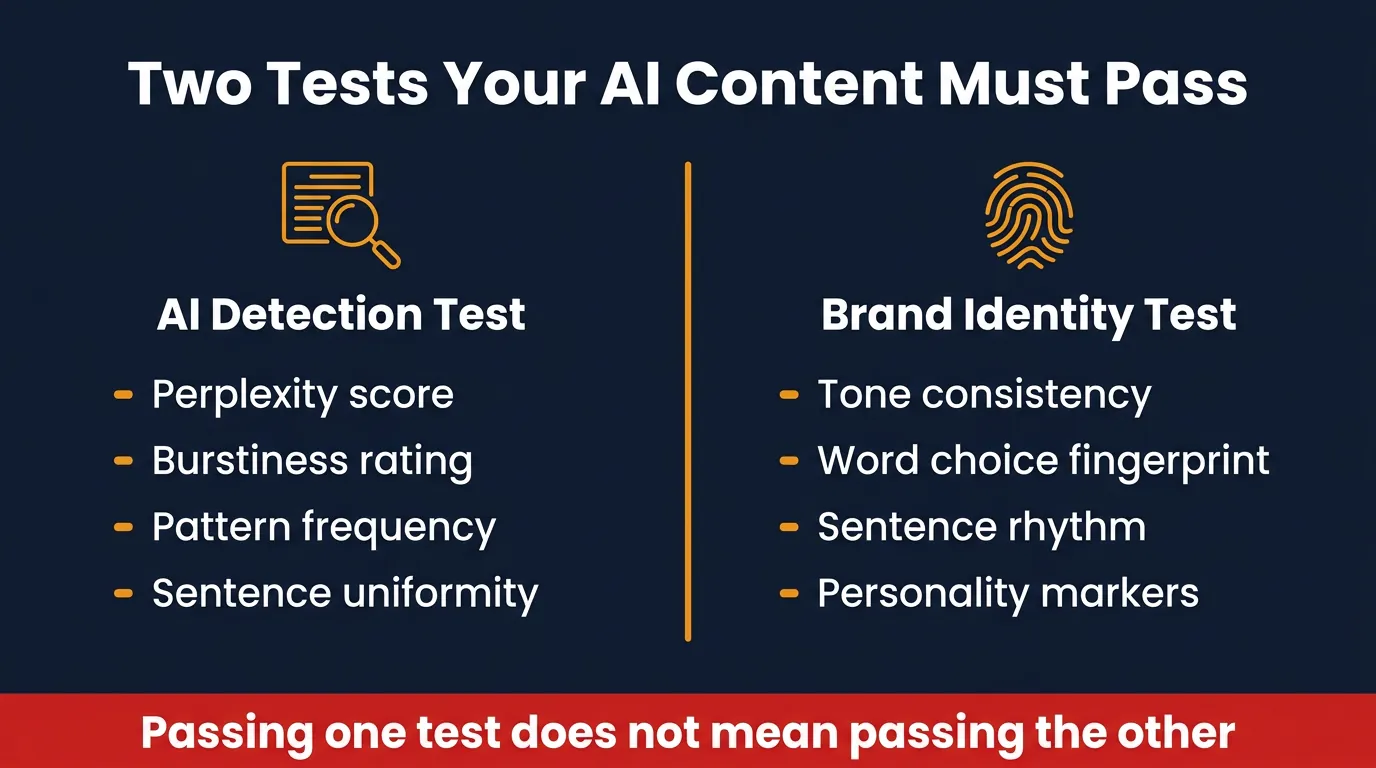
You passed one and failed the other. Most workflows only account for the first. That’s the gap this article closes.
How AI Defaults to the Most Average Voice Possible
AI generates from statistical patterns across its training data. The output reflects the median of everything it learned. Distinctive brand voice is structurally the opposite of median output.
Generic humanization tools make this worse. They scan finished content for AI-pattern signals, and signature phrases, unusual rhythm, strong opinions all look like artifacts to the tool. So they get flattened. The content gets doubly sanitized. No AI tells, no brand identity either.
You end up with content that belongs to no one. Clean. Readable. Invisible.
The Structural Flaw in Every Generic Humanization Tool
Humanization tools are not broken. They’re solving half the problem.
What Humanization Tools Actually Remove
These tools target patterns, not meaning. They flatten sentence variation, strip transitional phrases that read as AI-generated, and sand down anything that looks statistically unusual. That process has no way to tell a robotic filler phrase apart from a signature opener your brand uses deliberately. (this is the part most people miss entirely) Forbidden words in your voice profile and AI-artifact words look identical to the scanner. So both get cut.
Over-sanitization isn’t a bug. It’s what the tool was built to do. It removes everything flagged, and your brand quirks are flagged.
The result is clean content with no fingerprints. That’s not brand voice preservation. That’s brand erasure.
Why Reactive Editing Cannot Recover What Was Never There
Post-processing works on what already exists in the draft. It cannot inject what was never encoded upstream. Humanization is a subtraction operation. You cannot subtract your way to a distinctive voice.
If your tone, rhythm, and signature phrases weren’t in the prompt, they aren’t in the output. Running that output through a humanizer strips away more. You finish further from your brand than when you started. The structural flaw isn’t the tool. The flaw is treating humanization as the only step.
The Mental Model Shift That Changes Everything
Proactive Voice Encoding vs Reactive Humanization
Most AI content workflows run backwards. Generation comes first, voice gets patched in at the end.
Flip that order.
Proactive voice encoding puts your tone descriptors, forbidden words, and signature phrases into the prompt before a single sentence gets generated. The AI operates from your brand constraints, not its statistical defaults. Reactive humanization tries to recover voice that was never encoded to begin with. One approach produces content that sounds like you. The other produces content that sounds like the average of the internet.
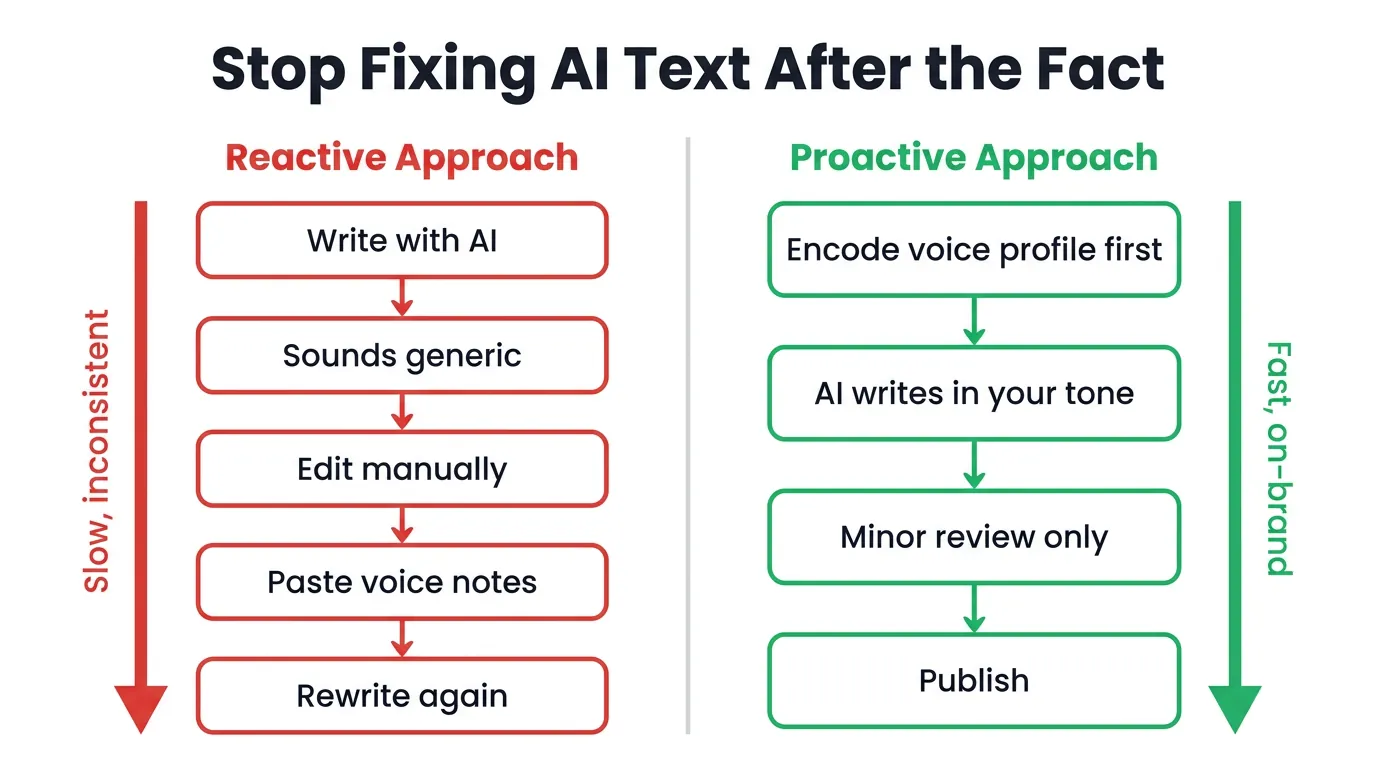
Workflow order determines the outcome. That decision gets made before you write a single word.
Voice-first generation changes what humanization actually needs to do. When the output already reflects your brand, humanization becomes artifact removal, not reconstruction. A much smaller job.
Why Humanization Becomes Easy When Voice Comes First
Light cleanup is faster than full sanitization, and it preserves far more of what matters. When AI artifacts are the only target, the tool strips robotic patterns without touching your rhythm or signature phrases. That’s the goal: humanize without erasing. Workflow order is what makes that possible.
The 5-Step Framework to Make AI Content Sound Human and On-Brand
Five steps. Sequence matters.
Steps 1 and 2 Build the Foundation Before You Write a Word
Step 1 is building your voice profile. Step 2 is encoding it at the prompt layer before generation starts. A voice profile is not a style guide document. It’s a prompt-ready specification that tells the AI exactly how your brand writes.
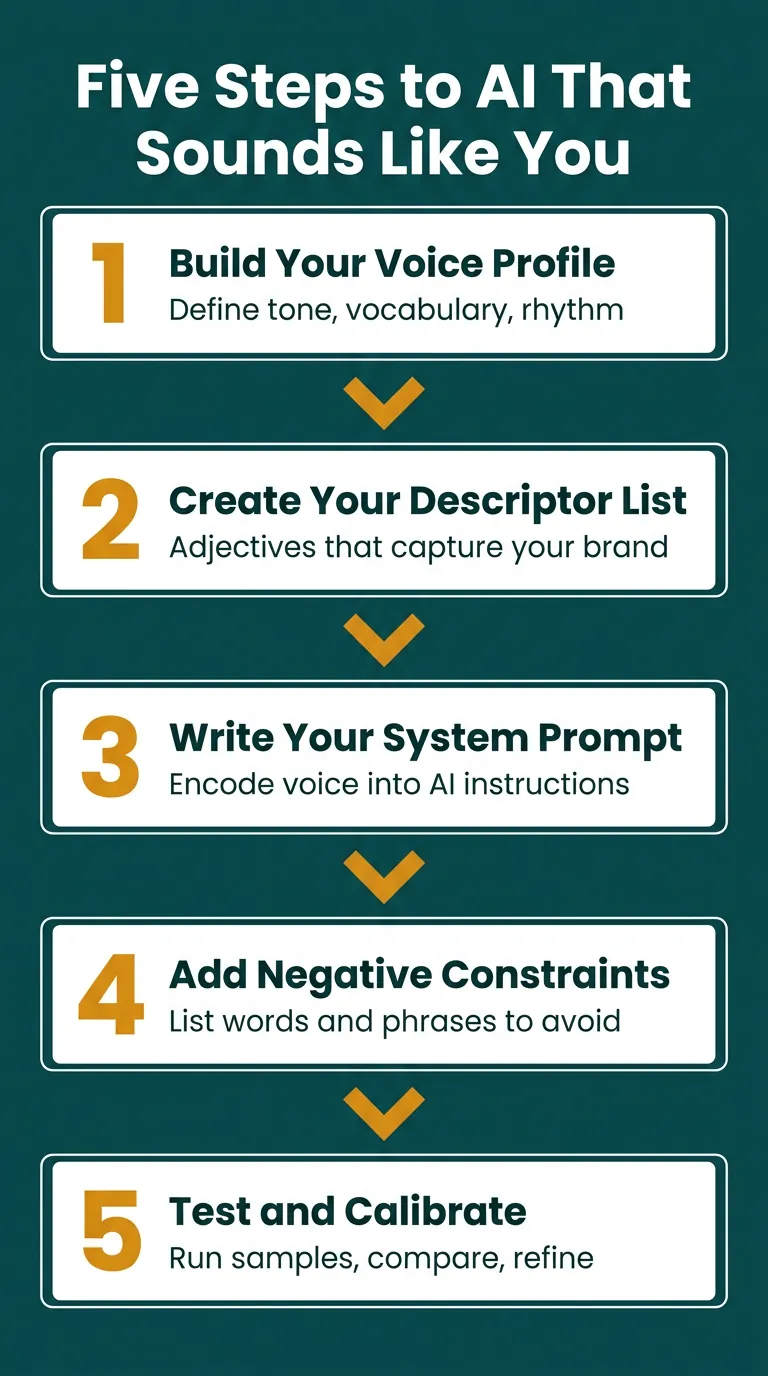
Your profile needs tone descriptors that capture behavior, not just adjectives. It needs sentence rhythm preferences (short and punchy, or long and layered?). It needs forbidden words, signature phrases you use deliberately, and the specific way your brand addresses its reader. Every field in that profile goes into the prompt. The AI generates from your brand constraints, not its defaults. This front-loads the work where it produces the most return. Nothing downstream fixes a bad foundation.
Build the profile once. Use it every session.
Steps 3 and 4 Generate Then Refine Without Erasing
Step 3 is voice-aware generation. Step 4 is a targeted humanization pass for artifacts only. When your voice profile is encoded in the prompt, the output already sounds like your brand. Humanization at this stage has a narrow job: remove robotic phrasing, fix unnatural transitions, smooth sentence variation. That’s it.
The voice is already in the content. Don’t let the humanization tool touch it.
Targeted removal runs faster than full sanitization and produces cleaner output because you’re not stripping identity along with artifacts.
Step 5 Is the Brand Gut-Check That Most Workflows Skip
Reading cold misses voice drift.
Most writers finish Step 4 and publish. That’s the mistake. Step 5 is checking finished content against your voice profile directly. Does the tone match your descriptors? Are any forbidden words present? Do the signature phrases appear where they should? (this is where the gut-check becomes structured rather than subjective) Platforms like AI BrandFactory encode this at the system level through an 18-field Voice Profile that auto-applies to every generation. The profile comparison happens by design, not by memory. Without that structure, Step 5 is the easiest step to skip and the most costly one to miss.
What a Real Voice Profile Actually Contains
A voice profile has seven core fields. Each one earns its place.
The Seven Fields Every Voice Profile Needs
- Tone descriptors – behavioral descriptions, not just adjectives: not “professional” but “direct without being cold, confident without hedging”
- Sentence rhythm preferences – short and punchy, long and layered, or a specific mix
- Forbidden words – the phrases your brand never uses, which matter just as much as the ones you do use
- Signature phrases – specific openers, closers, or transitions your brand deploys deliberately
- Audience address style – how your brand speaks directly to its reader, whether that’s peer-to-peer, teacher-to-student, or something else entirely
- Opinion stance – does your brand take positions, or does it present multiple views?
- Structural preferences – covering how content opens, how arguments build, how conclusions land
Those seven fields make the profile prompt-ready.
How Platforms Like AI BrandFactory Encode This at Scale
Seven fields are a strong start. Eighteen fields are a complete system.
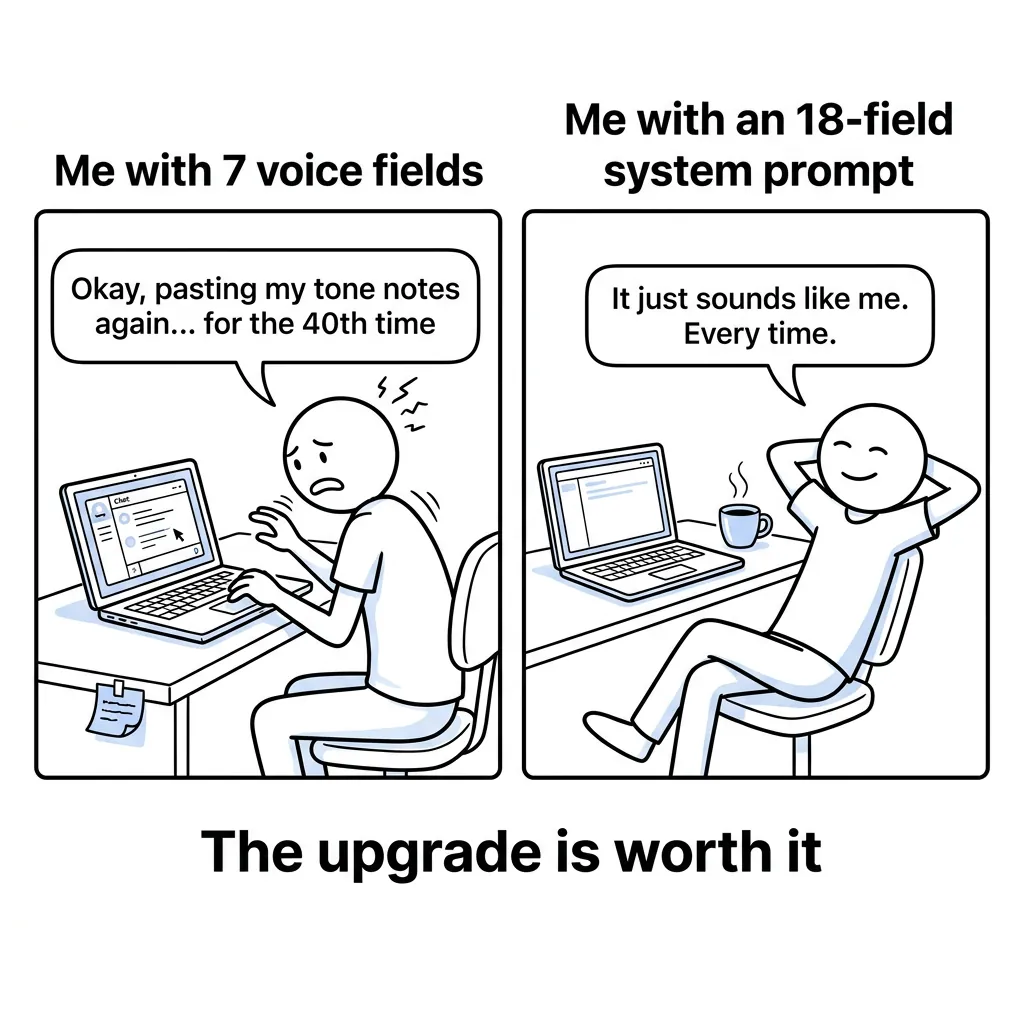
AI BrandFactory builds this out through an 18-field Voice Profile that covers every dimension of brand voice in a systematic way. The profile auto-applies across every tool and every generation, not just when you manually paste it into a prompt. That’s the architectural fix this whole article has been pointing toward. Encoding upstream means humanization tools function as intended: light artifact removal on content that already sounds like the brand. (and that shifts the economics of the entire workflow)
The upstream fix makes every downstream step easier. That’s the whole point.
Conclusion
Humanization tools were never the real issue. Using them as your only step was. Workflow sequence decides whether humanization strengthens or wrecks your brand voice.
Build your voice profile before your next AI content session.
Lock it into the prompt layer, generate from your brand constraints, then run humanization as a light artifact pass. These tools aren’t broken. They just belong at the end of the process, not as the whole process.