Pinterest Marketing for Business: The Complete 2026 Guide
Compass Pointing to Red Pin on Pinterest-Style Mood Board Map, Candlelit Still Life
Why Pinterest Beats Every Other Platform for Small Business Discovery
The Search Engine Nobody Is Treating Like One
Pinterest users aren’t scrolling to see what friends ate for lunch. They show up actively searching for ideas, products, and solutions they intend to act on.
Instagram centers on social connection and lifestyle content. LinkedIn is professional networking. Pinterest is a visual search and planning tool where users arrive with purpose. When someone opens Pinterest, they’re already in buying or building mode.
That intent gap is massive for small business owners. A pin surfacing during “minimalist home office ideas” reaches someone ready to purchase, not just browse. No other platform delivers that purchase-ready mindset at scale.
Pinterest is the quiet channel most competitors ignore entirely.
How 97% Unbranded Search Creates a Level Playing Field
Pinterest SEO rewards relevance over authority. New accounts with zero followers can rank on day one. This is why marketing with Pinterest works so well for small businesses in discovery-driven niches.
How to Set Up Your Pinterest for Business Account the Right Way
Setup takes under 15 minutes via business.pinterest.com.
Business Account vs Personal Account – What Actually Changes
Pinterest Analytics – surfaces impressions, saves, and outbound clicks
Ads Manager – opens up promoted pins so you can amplify organic content
Rich Pins eligibility – brings real-time metadata syncing from your website
Claiming your website – earns a verified badge that signals credibility to both Pinterest and your audience
What Rich Pins Do That Regular Pins Cannot
Product Rich Pins – sync prices and availability in real time, so pins never display outdated information
Article Rich Pins – pull your headline and meta description straight from your page
Recipe Rich Pins – surface ingredients and serving details without requiring a click
Apply for Rich Pins through Pinterest’s validator tool after claiming your website. The process requires proper Open Graph or Schema markup on your site pages. Most modern WordPress themes handle this automatically.
One timing detail beginners consistently miss: new URLs take approximately 7 days to index on Pinterest. Freshly pinned content won’t distribute widely until that settling period passes. Plan your launch pins accordingly.
Build a Pin Library That Actually Drives Traffic
Why Infographics Outperform Every Other Pin Format
Infographics deliver standalone value without requiring a click. That’s why they get saved at significantly higher rates than standard image pins. Saves signal to the Pinterest algorithm that content is worth distributing more widely. More saves equals more reach equals more traffic, compounding over time. Vertical format pins at a 2:3 ratio perform best in mobile feeds and search results. One well-designed infographic can drive saves and clicks for months after publishing. Focus your content production here first before exploring other formats.
Infographic-first is the strategy.
Board names function like category pages, so keyword-rich names improve your overall account discoverability. Pin titles and descriptions should use the exact phrases your audience searches for, not internal brand language. Consistent pinning signals to the algorithm that your account is active and worth distributing. Think about Pinterest SEO the same way you’d think about Google SEO.
How to Build a 300-Pin Library Without Burning Out
Aim for 10 to 15 pins per week across 5 to 7 boards. Repurpose one blog post into 3 to 5 pin variations targeting different keyword angles.
For solo founders who need volume without a design team, AI BrandFactory’s Infographic Generator is worth knowing about. It’s the tool behind a 330-pin library built without a designer or hours in Canva. Solopreneurs can produce pin-ready infographics at scale, which is exactly what Pinterest rewards.
Batch your content creation into one weekly session. Use a content calendar to plan topics two weeks ahead. Repurpose existing blog posts, product pages, and FAQs into pin-sized formats. One piece of existing content can generate 5 pins targeting different search angles.
Scale Your Pinterest Output with Tailwind Without Adding Hours to Your Week
Pinning manually every single day? Not sustainable. Tailwind fixes that.
Tailwind is the industry-standard scheduling tool for Pinterest marketing, and the gap between it and Pinterest’s native scheduler is substantial.
What Tailwind Does That the Native Pinterest Scheduler Cannot
SmartLoop – automatically re-pins your strongest evergreen content on a set rotation so nothing goes stale
Bulk scheduling – lets you load 30 to 50 pins in one session and spread them across optimal posting times
Tailwind Communities – connect you with niche accounts for mutual re-pinning and reach amplification. Your content reaches new audiences without any paid spend.
Analytics – show which pin formats and topics drive the most outbound clicks, not just impressions
The Weekly Pinterest Workflow That Takes Under One Hour
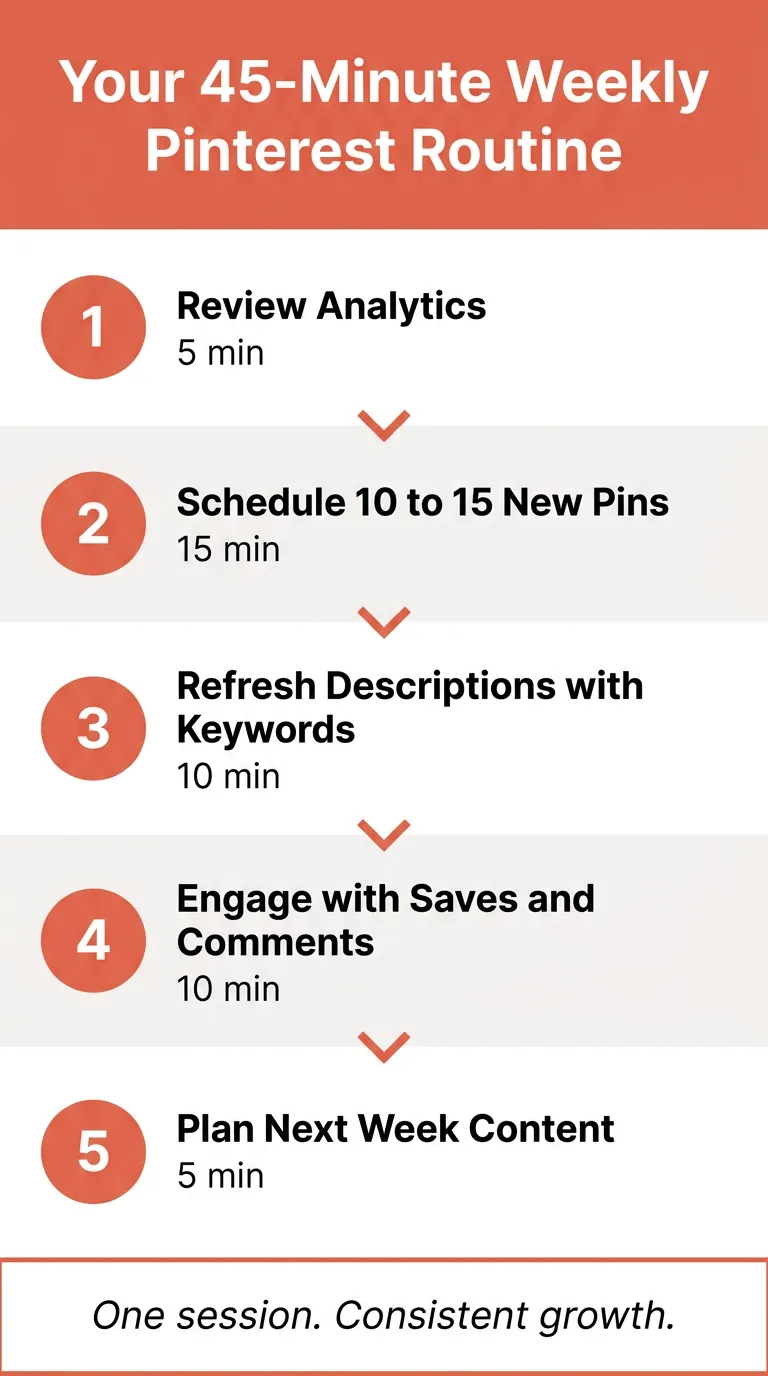
Block one 45-minute session per week to create fresh pins and load them into Tailwind.
SmartLoop handles your evergreen board content automatically between those new pin batches.
Check Tailwind analytics once a month to identify what’s actually driving traffic versus what just collects saves.
Adjust your content mix based on that data, not guesswork.
When to Start Advertising on Pinterest and How to Do It Right
Don’t start with ads.
Your 45-Minute Weekly Pinterest Routine – 5-Step Workflow Infographic
Why Promoted Pins Work Differently Than Facebook or Instagram Ads
Facebook and Instagram ads cut into users’ scrolling with content they never sought out. Promoted Pins slot naturally into search results and home feeds right alongside organic content. Research indicates that Pinterest users often engage with content while planning purchases., actively searching for what to buy. That intent alignment creates less friction between ad impression and purchase decision. Advertising on Pinterest reaches people already moving toward buying something, not people you’re starting from zero to convince.
That’s a fundamentally different dynamic from interruptive ad formats. The platform’s unbranded search behavior carries over to paid results too.
How to Run Your First Pinterest Ad Campaign Without Wasting Budget
Start with organic validation first. Only promote pins that already perform well organically, because those have proven resonance with your audience.
Use keyword targeting in Ads Manager to reach users searching your product category.
Set a $50 to $100 test budget before scaling.
Use Pinterest Analytics to track which promoted pins drive actual outbound clicks and conversions, not just impressions.
A small test tells you what converts before you commit real budget.
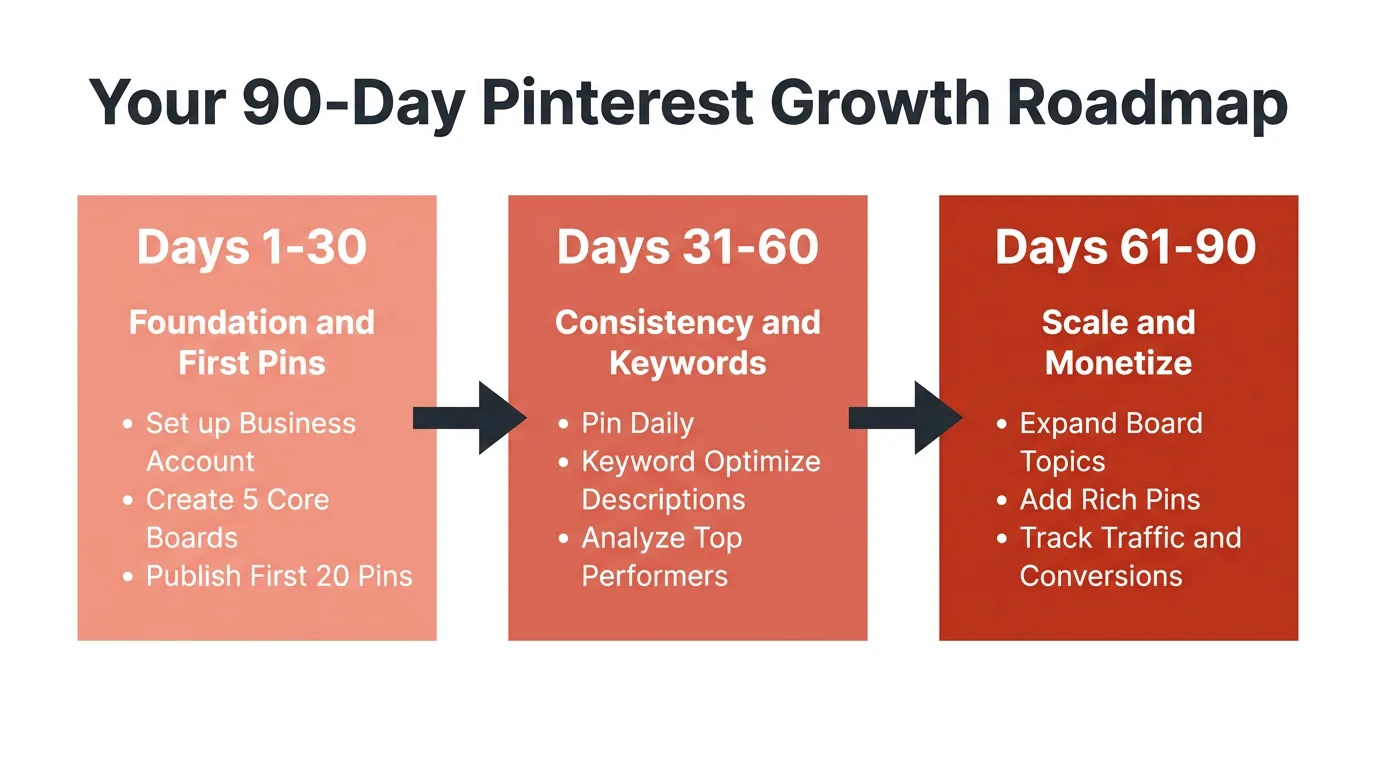
Your 90-Day Pinterest Action Plan Starting from Zero
Complete your Pinterest for Business account setup and claim your website.
Apply for Rich Pins right after that claiming step.
Build 5 to 7 boards with keyword-rich names that align with your core content topics.
Publish 10 to 15 pins across the first month to start signaling consistency to the algorithm.
Follower count doesn’t matter yet. Setup quality and keyword research are the only things worth your attention during this stretch.
Foundations beat volume in month one. Every time.
Days 31 to 60: Build Volume and Watch the Data
Load Tailwind with a full month of pins and activate SmartLoop for your top evergreen boards. Pull up Pinterest Analytics weekly and track impressions, saves, and outbound clicks. Keep the 7-day URL rule in mind: your early pins are only now reaching full distribution. Modest numbers are completely normal here because the algorithm is still learning your account.
Days 61 to 90: Optimize and Consider Your First Ad Test
Find your top 5 performing pins and produce 3 to 5 variations of each one. Small brands in home decor, food, and DIY niches typically see Research indicates that brands in specific niches can observe increased referral traffic over time on Pinterest.. Run a small Promoted Pin test on your single strongest organic performer. Everything in this phase should trace back to what your first 60 days actually showed you.
Pinterest functions as a visual search engine whose users arrive already primed to find, plan, and buy. That single fact reshapes your entire marketing approach. Setup, content, and consistency are the three pillars.
The 90-day framework is realistic, not pessimistic.
Rich Pins, infographic content, and Tailwind scheduling build a compounding traffic engine that grows stronger over time. Convert to a Pinterest business account today. Everything else follows from that one move.